Showing posts with label Plugins. Show all posts

Monday, 8 January 2018

Unable to connect Plugin registration tool to Latest Dynamics 365 Version 9.0

Unable to connect plugin registration tool 

Recently i created a trial D365 org (version 9.0.0.3172) and tried connecting plugin registration tool downloaded with PRT of lastes sdk (version 8.2.1.1)from downloaded form here which is latest as on date on that portal of MS.

Newly created trail org is of version 9.0. while the latest sdk available is 8.2 but i though it shouldn't be any problem (though it was) since we were used to of using older version plugin registration tools with newer version of CRM ( remember connecting CRM 2013 organisation with PRT of 2011 sdk).


On some digging i found that reason of the same:

Latest Update on Dynamics CRM V9:


Latest update in the Microsoft TSL(Transport Security Layer) Protocol in SDK assemblies.

Microsoft allowed the TSL connection 1.0  and 1.1 for the browsers or client to connect the CRM org. Now Microsoft will support only TSL 1.2 or above. Can get more information here

If you are connecting your latest dynamic CRM trial org with the old version of plugin registration tool or connecting any external application, then you may face an issue.


TSL protocol of our .Net client is usually 1.0. You can check how to check tsl protocol of your .Net client by downloading fiddler from here

Once Fiddler gets installed, Go to Tools > Options in order to check Protocol version:


To Resolve Plugin registration connection issue we need to install Latest Plugin registration tool from Nuget rather than using PRT(Plugin registration tool) available in latest sdk available on MS website which is version 8.2.1.1 :-

Resolution:

There are 2 way of installing Latest Plugin registration tool easily:-
Option A:-

1. Create/Open a project in Visual studio


2.  Navigate to Tools>NuGet Package Manager>Package manager console


3. Paste following command in Packager manager console and hit enter:
Install-Package Microsoft.CrmSdk.XrmTooling.PluginRegistrationTool -Version 9.0.0.7


once executes, this will install the package in current opened solution folder.

4. Open the folder of the solution opened in Visual studio:


5. You'll see PRT V 9.0 in package folder:


6. Now try to connect to your version 9.0 CRM trial, it'll get connected. :)


Option B:-


1. Create a new project just like step 1 of Option A.

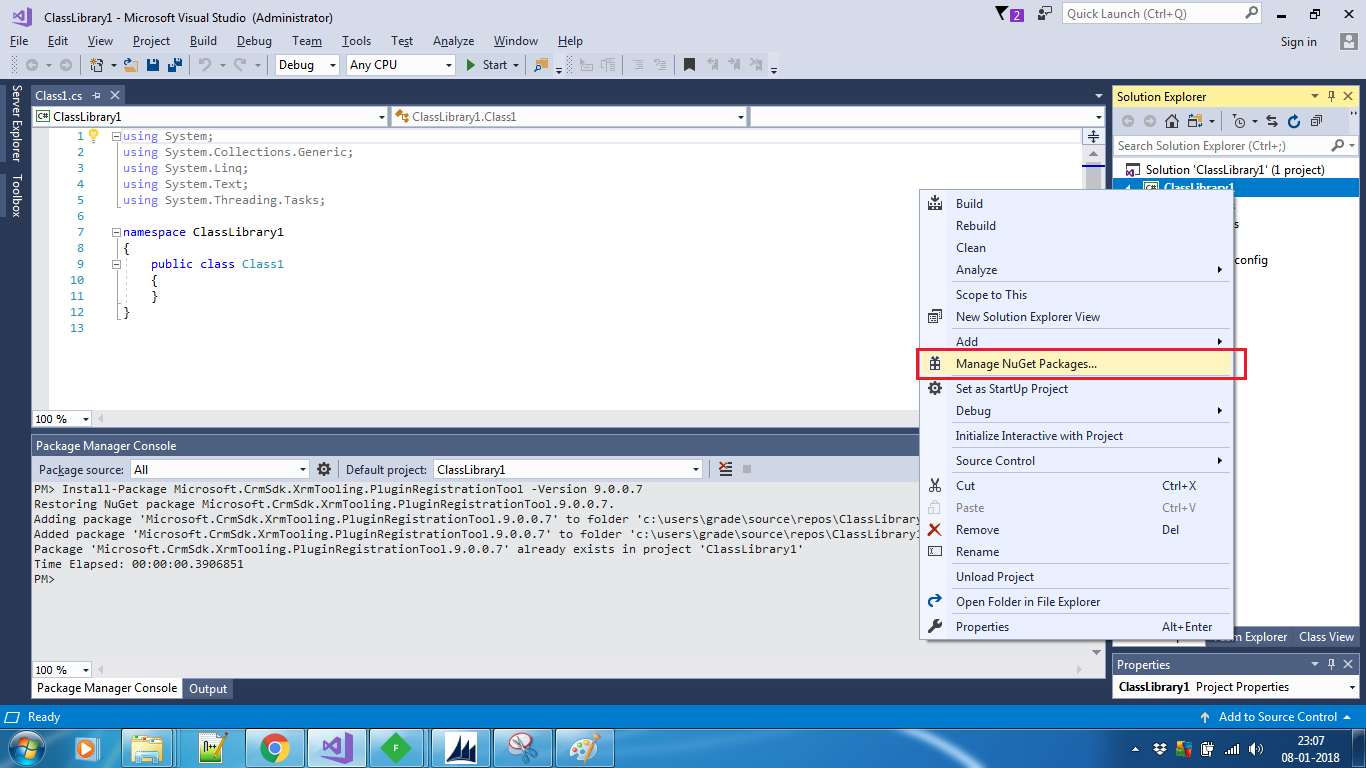
2. Right click on the project and click manage NuGet Packages:


3. Click on browse and enter 'Microsoft.CrmSdk.XrmTooling.PluginRegistrationTool'  and click install:-


4. It'll install the package in your solution's folder:-


5. You can navigate to the installed package same as step 4 and 5 of option A mentioned above.

6. Now connect your PRT with version 9.0 crm org and enjoy plugin registration.

Happy CRM,

Sunday, 27 August 2017

How to send data in excel along with an email in CRM using C#

How to send data in excel along with an email in CRM using C#

In the previous post i discussed how can we convert a datatable into a csv file using c#.

Often in Dynamics crm we face the requirement that customer wants some data in excel attached along with the email on some regular interval or so. To do so, the first option looks like we paste the result into email body and send it as email to customer. But that doesn't looks good as user can't do much with email body what he can do if he receive that data in an excel sheet. What if we can send him data into excel attached with the email?? But the question arise, do we need to have office on the server running code?? The latest answer is: NO. Because you can create a csv file in c# and attach it along with a crm email and send it to concerned person.

For ex: Customer wants that he should get an email daily of having the number of cases created on the same day as per their origin.

Like:
Originated from    Count
Phone call             200
Email                    120
Chat                       80
Web                       400

So to send such kind of data into excel what we can do is, we can extract the data into a datatable using some C# code from their crm application and convert the datatable into CSV as explained in previous post.   Once you get the comma separated value as result from datatable, you can then create an email record into crm and pass the guid of email record along with csv result.

Below function will attach the csv string in the form of a csv with that email which can be opened easily in excel.

/////////////////////////////////////////////////////////////////////////////////////////////////////////////////////////////////////////////////////////////////////////////////////
   //Function to  add csv message as attachment with the email record of passed guid
        public static void addAttachmenttoEmail(Guid emailguid, String message, IOrganizationService service)
        {
            Entity attachment = new Entity("activitymimeattachment");
            attachment["subject"] = "SampleCSV";
            string fileName = "Sample.csv";
            attachment["filename"] = fileName;
            byte[] fileStream = Encoding.ASCII.GetBytes(message);

            attachment["body"] = Convert.ToBase64String(fileStream);
            attachment["mimetype"] = "text/plain";
            attachment["attachmentnumber"] = 1;
            attachment["objectid"] = new EntityReference("email", emailguid);
            attachment["objecttypecode"] = "email";
            service.Create(attachment);
        }


/////////////////////////////////////////////////////////////////////////////////////////////////////////////////////////////////////////////////////////////////////////////////////

Don't forget the send that email with which we just attached the csv string.

Happy Learning...!!

Friday, 10 February 2017

How to pass configuration parameters in plugins in MS Dynamics CRM

How to pass configuration parameters in plugins in MS Dynamics CRM


Many times, we face a situation where we need to hard-code things in plugins which we know might get changed in future. 
For ex:
1. If we are sending emails from plugins, we might need to hard-code the name/guid of the sender queue, which in-face might be different for different instances.
2. When we are sending SMS' using plugin and have url of SMS vendor which we need to hit in order to send the SMS. We have to hard-code url in plugin code itself.
I'm sure there are many more scenario where we have to hard-code things which we wish we can keep configurable for future change scope.

In this post, we'll discuss how we can pass parameters to our plugin code and in what way so that it can be easily modified with minimum efforts.

I'm sure you have seen the below highlighted boxes while registering the step of a plugin:

So for what they are used?

These are used to pass configuration to plugins.

There are 2 ways of doing that:
1. Unsecure configuration
2. Secure Configuration

So what is the difference b.w these 2 types?

Below is the difference b/w these 2 types:-
Unsecure Config Secure Config
Readable by any CRM User Yes No
Moves Between Environments with Solutions Yes No
Available when Plugin is Registered for Outlook Offline Mode Yes No


So how do we pass it through any of the above method?

In this post we'll discuss how we can pass different type of parameters to plugin.

For demonstration, we'll pass 4 types of parameters to a plugin running on contact i.e.
1. String
2. Integer
3. Boolean
4. Guid
and will show that these are actually passed by updating all parameters into the description field.

I'm sure passing parameter is way more useful than storing it in the description..!!
You can use it as per your requirement.

We created a class named PluginConfiguration in our plugin having below code:-
///////////////////////////////////////////////////////////////////////////////////////////////////////////////////////////////////////////////////////////////////////////
using System;
using System.Collections.Generic;
using System.Linq;
using System.Text;
using System.Threading.Tasks;
using System.Xml;

namespace PluginConfigurationTest
{
    class PluginConfiguration
    {
        private static string GetValueNode(XmlDocument doc, string key)
        {
            XmlNode node = doc.SelectSingleNode(String.Format("Settings/setting[@name='{0}']", key));

            if (node != null)
            {
                return node.SelectSingleNode("value").InnerText;
            }
            return string.Empty;
        }

        public static Guid GetConfigDataGuid(XmlDocument doc, string label)
        {
            string tempString = GetValueNode(doc, label);

            if (tempString != string.Empty)
            {
                return new Guid(tempString);
            }
            return Guid.Empty;
        }

        public static bool GetConfigDataBool(XmlDocument doc, string label)
        {
            bool retVar;

            if (bool.TryParse(GetValueNode(doc, label), out retVar))
            {
                return retVar;
            }
            else
            {
                return false;
            }
        }
        public static int GetConfigDataInt(XmlDocument doc, string label)
        {
            int retVar;

            if (int.TryParse(GetValueNode(doc, label), out retVar))
            {
                return retVar;
            }
            else
            {
                return -1;
            }
        }

        public static string GetConfigDataString(XmlDocument doc, string label)
        {
            return GetValueNode(doc, label);
        }
    }
}

///////////////////////////////////////////////////////////////////////////////////////////////////////////////////////////////////////////////////////////////////////////
For demo purpose, we have set the step to fire on change of fax and extracted the passed parameters and stored them in the description of contact.

Below is the code of our plugin class file where we extracted the parameters from xml by parsing it with the help of PluginConfiguration:-
///////////////////////////////////////////////////////////////////////////////////////////////////////////////////////////////////////////////////////////////////////////
using System;
using Microsoft.Xrm.Sdk;
using System.Xml;

namespace PluginConfigurationTest
{
    public class ConfigTest : IPlugin
    {
        String  stringParam = String.Empty;
        int integetParam;
        bool boolParam;
        Guid guidParam = Guid.Empty;
        //Created a constructor to initialize the variable with passed parameters
        public ConfigTest(string unsecureString, string securedString)
        {
            try
            {
                XmlDocument doc = new XmlDocument();
                doc.LoadXml(unsecureString);
                stringParam= PluginConfiguration.GetConfigDataString(doc, "string");
                integetParam = PluginConfiguration.GetConfigDataInt(doc, "int");
                boolParam = PluginConfiguration.GetConfigDataBool(doc, "bool");
                guidParam = PluginConfiguration.GetConfigDataGuid(doc, "guid");

            }
            catch (Exception ex)
            {

                throw new Exception("Error " + ex.Message);
            }
        }
        public void Execute(IServiceProvider serviceProvide)
        {
            #region SetUp
            IPluginExecutionContext context = (IPluginExecutionContext)serviceProvide.GetService(typeof(IPluginExecutionContext));
            IOrganizationService service = ((IOrganizationServiceFactory)serviceProvide.GetService(typeof(IOrganizationServiceFactory))).CreateOrganizationService(context.UserId);
            #endregion
            if ((context.InputParameters.Contains("Target")) && (context.InputParameters["Target"] is Entity) & context.Depth < 3)
            {
                Entity entity = (Entity)context.InputParameters["Target"];
                if (entity.LogicalName != "contact")
                    return;
                try
                {
                    entity["description"] = "1." + stringParam + "\n2." + integetParam + "\n3." + boolParam + "\n4." + guidParam.ToString();
                    service.Update(entity);
                }
                catch (Exception ex)
                {
                    throw new Exception("Error " +ex.Message);
                }
            }
        }
    }
}

///////////////////////////////////////////////////////////////////////////////////////////////////////////////////////////////////////////////////////////////////////////


Below is the xml we created to be passed in plugin step:
///////////////////////////////////////////////////////////////////////////////////////////////////////////////////////////////////////////////////////////////////////////
 <Settings>
       <setting name="string">
           <value>Vishal Kumar</value>
       </setting>   
  <setting name="int">
           <value>23</value>
       </setting>   
   <setting name="bool">
           <value>true</value>
       </setting>   
   <setting name="guid">
           <value>6F6A7298-53EF-E611-8111-C4346BDC3C21</value>
       </setting>   
   </Settings>
///////////////////////////////////////////////////////////////////////////////////////////////////////////////////////////////////////////////////////////////////////////
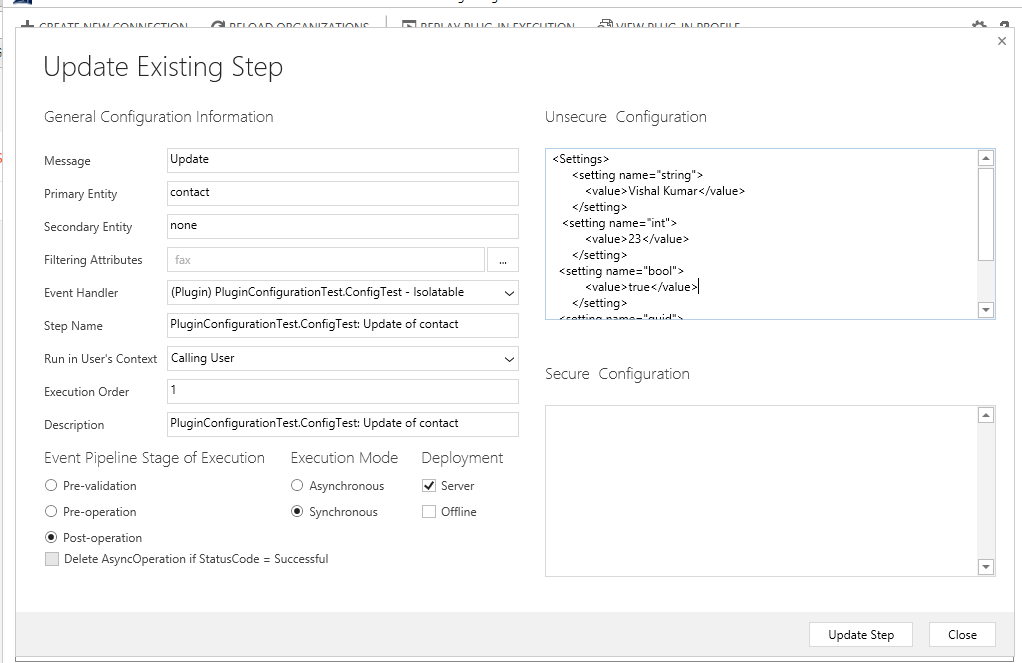
We need to put this xml to in unsecure configuration box and update the step to pass this to the plugni on this step.
Below is the plugin step for reference:-


Below is the  output of the plugin on the contact record:-
I hope the post was helpful.

You can utilize the feature to pass parameters to plugins and change those whenever needed.