Tuesday, 16 August 2016

MS CRM Error: The Entity Relationship with SchemaName = '" was not found in the MetadataCache

MS CRM Error: The Entity Relationship with SchemaName = '" was not found in the MetadataCache


Recently i was having this issue while opening any existing account record or creating a new account record in a CRM org.
Error message: The Entity Relationship with SchemaName = '" was not found in the MetadataCache

Log file
///////////////////////////////////////////////////////////////////////////////////////////////////////////////////////////////////////////////////////////////////////////////////////////////////
Unhandled Exception: System.ServiceModel.FaultException`1[[Microsoft.Xrm.Sdk.OrganizationServiceFault, Microsoft.Xrm.Sdk, Version=8.0.0.0, Culture=neutral, PublicKeyToken=31bf3856ad364e35]]: System.Web.HttpUnhandledException: Microsoft Dynamics CRM has experienced an error. Reference number for administrators or support: #D985AF1CDetail: 
<OrganizationServiceFault xmlns:i="http://www.w3.org/2001/XMLSchema-instance" xmlns="http://schemas.microsoft.com/xrm/2011/Contracts">
  <ErrorCode>-2147220970</ErrorCode>
  <ErrorDetails xmlns:d2p1="http://schemas.datacontract.org/2004/07/System.Collections.Generic" />
  <Message>System.Web.HttpUnhandledException: Microsoft Dynamics CRM has experienced an error. Reference number for administrators or support: #D985AF1C</Message>
  <Timestamp>2016-08-16T06:57:30.9208191Z</Timestamp>
  <InnerFault>
    <ErrorCode>-2147220918</ErrorCode>
    <ErrorDetails xmlns:d3p1="http://schemas.datacontract.org/2004/07/System.Collections.Generic" />
    <Message>The Entity Relationship with SchemaName = 'new_account_new_orderproduct_CustomerName' was not found in the MetadataCache</Message>
    <Timestamp>2016-08-16T06:57:30.9208191Z</Timestamp>
    <InnerFault i:nil="true" />
    <TraceText i:nil="true" />
  </InnerFault>
  <TraceText i:nil="true" />
</OrganizationServiceFault>

///////////////////////////////////////////////////////////////////////////////////////////////////////////////////////////////////////////////////////////////////////////////////////////////////

Now what i had done is that on a custom entity order product, i had created a lookup of account entity. (Oh please don't ask why we created custom entity named order product..!)

Also on account record, i have attached a grid of all order products (custom entity) using that lookup of account i created on custom order product entity.

Now the issue start occurring when i deleted the lookup of customer entity from custom order product entity.

I forget that relationship formed from this lookup has been used in that grid on account form.

Now whenever i tried to open main crm form (existing account or a new one) system throw the above error.

It'll off-course throw this error because metadata on account form have the reference to such a relationship which doesn't exist any more..!

So to fix this what i did is, i removed the grid of custom order product entity from account entity which was referring a relationship which doesn't exist anymore.

So the thing we learn from this is that whenever we are deleting a lookup we should keep in mind that we are also deleting the relationship associated with it.

And if that relationship is used anywhere else, for this case in a grid, system will always create an issue.


Hope it would be helpful.
Feel free to comment and improve.

Sunday, 14 August 2016

MS CRM error: 1 is not a valid status code for state code SalesOrderState

1 is not a valid status code for state code SalesOrderState.Submitted on salesorder with Id <Guid>


Error Code -2147187704

Today i face the error on while creation of sales order in Dynamics CRM online 2016. System wasn't letting the user create sales order and throwing a generic exception with message :

1 is not a valid status code for state code SalesOrderState.Submitted on salesorder with Id <Guid>

with error code: -2147187704.

This was pretty unusual because i know that 1 is a valid status code code for sales order.

After much research, the solution i found was then relatively easy. For the user the indicator "Integration Users Mode" in the user administration was switched to Yes. 

But the problem was this flag isn't usually displayed on the CRM user form.
So here i used little trick. I created a on demand workflow to set back the field to NO and run the on demand workflow on the user.  

After I put this flag back to No everything was working as per the expectations.

My observation is that recently the user had experimented with the CRM connectors to connect the CRMs with Navision, while the flag was changed by the Connector.


Hope it would be helpful.
Please comment if any better solution exist.

Friday, 10 June 2016

How to find GUID of record in Microsoft Dynamics CRM using bookmark

How to find GUID of record easily using bookmark in Microsoft Dynamics CRM (the cool way)


I this post we'll learn a cool hack to get the GUID of the current record using bookmark.
Conventionally what we do is click on email a link on the CRM page and the link get opened in
outlook and you copy the guid. Seems boring..! isn't it?


Now we have a cool way to get GUID of the record of Microsoft dynamics crm.

Here is what you have to do:

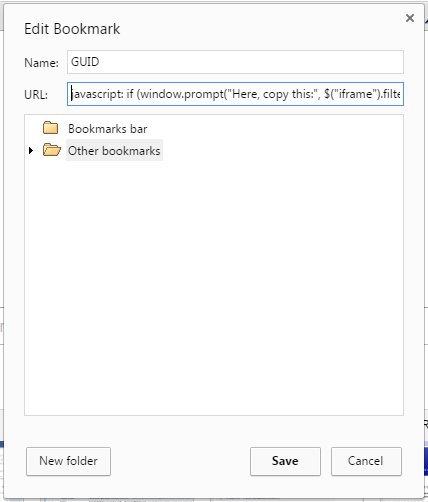
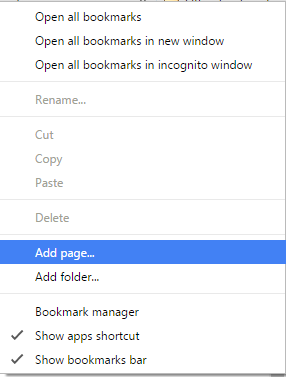
Create a new bookmark in google chrome :


Copy paste the below code as the url of your bookmark:

//////////////////////////////////////////////////////////////////////////////////////////////////////////////////////////////////////////////////////////////////////////////////////////////////////////

javascript: if (window.prompt("Here, copy this:", $("iframe").filter(function () { return ($(this).css('visibility') == 'visible') })[0].contentWindow.Xrm.Page.data.entity.getId().slice(1, -1))) { }

//////////////////////////////////////////////////////////////////////////////////////////////////////////////////////////////////////////////////////////////////////////////////////////////////////////


Now just open the record you want to get GUID in your browser and click on the bookmark you just created


Voila..!! Its done. You'll get the GUID in the box.

Hope it would be helpful.

Comments are highly appreciated..!!!

Happy CRMing 


Monday, 6 June 2016

How to send email with attachment in Microsoft Dynamics CRM using c#

How to send email along with attachment in Microsoft Dynamics CRM using c#

How to add attachments to an activity/email inMicrosoft Dynamics CRM using c#


Today we'll learn how we can send emails along with attachments using c# code.

There are situations when we need to generate emails using plugins or sometime we need to build

scheduler services to send emails along with attachments on regular interval.


In such scenario one needs to write code to create email activity in CRM using code and send that email from code itself.


Here is the C# code snippet to do the same:


How to create toParty:
//////////////////////////////////////////////////////////////////////////////////////////////////////////////////////////////////////////////////////////////////////////////////////////////////////////

   Entity toParty = new Entity("activityparty");
   toParty["participationtypemask"] = new OptionSetValue(0);
   toParty["addressused"] = "email address of receiver";
   toParty["fullname"] = "full name of 
receiver";


How to send email along with the attachment:
//////////////////////////////////////////////////////////////////////////////////////////////////////////////////////////////////////////////////////////////////////////////////////////////////////////
 public static void sendEmail(Entity to_Party,String Emailbody,String attachmentbody,IOrganizationService service)
        {
            Entity email = new Entity("email");
            Entity from_Party = new Entity("activityparty");
           
           QueryExpression queue = new QueryExpression("queue");
            queue.Criteria.AddCondition("name", ConditionOperator.Equal, "your sender queue name");
            queue.Criteria.AddCondition("statecode", ConditionOperator.Equal, 0);
            EntityCollection queueColl = service.RetrieveMultiple(queue);
            if (queueColl.Entities.Count > 0)
            {
                from_Party["partyid"] = new EntityReference("queue", queueColl.Entities[0].Id);
            }

            email["from"] = new Entity[] { from_Party };
            email["to"] = new Entity[] { to_Party };
            email["subject"] = "Subject of the Email";
            email["description"] = Emailbody;
            Guid emailguid = service.Create(email);

           //Add text attachment 
            addattachments(emailguid, service, attachmentbody);

            SendEmailRequest sendEmailreq = new SendEmailRequest
            {
                EmailId = emailguid,
                TrackingToken = "",
                IssueSend = true
            };
            SendEmailResponse sendEmailresp = (SendEmailResponse)service.Execute(sendEmailreq);  
        }

 public static void addattachments(Guid emailguid,String message,IOrganizationService service)
{
Entity attachment = new Entity("activitymimeattachment");
attachment["subject"] = "Attachment";
string fileName = "Attachment.txt";
attachment["filename"] = fileName;
byte[] fileStream = Encoding.ASCII.GetBytes(message);   

attachment["body"] = Convert.ToBase64String(fileStream);
attachment["mimetype"] = "text/plain";
attachment["attachmentnumber"] = 1;
attachment["objectid"] = new EntityReference("email", emailguid);
attachment["objecttypecode"] = "email";
service.Create(attachment);
}
////////////////////////////////////////////////////////////////////////////////////////////////////////////////////////////////////////////////////////////////////////////////////////////////

Hope it would be helpful.


Comments are highly appreciated..!!!

Happy CRMing